Microsoft Ignite 2026: What Enterprise AI Means for Communications Archiving
Microsoft's Ignite 2026 announcements put Copilot, connected enterprise data and AI agents at the center of work. Here is what that could mean for communications archiving.

On this page
We followed Microsoft's Ignite 2026 opening keynote 1 closely. Having worked in communications recording and archiving for many years, we're always looking at how new technologies might change what organizations can do with the information they capture. This year's announcements gave us a lot to think about.
Microsoft is going all-in on AI across the enterprise. Satya Nadella told the audience that "Copilot is the new operating system for work", bringing together AI assistants, autonomous agents, business applications, and organizational knowledge in one environment. The ambition goes well beyond helping employees write emails or summarize meetings. Microsoft wants AI to become part of how organizations find information, make decisions, and get work done.
What stood out was how the announcements fit together. Microsoft IQ 2 aims to make enterprise knowledge available to AI agents, Copilot provides the interface through which people work with that intelligence, and Agent 365 3 introduces the controls needed to manage and govern those agents. Microsoft also demonstrated new ways for people and AI agents to work together, including shared Copilot Workspaces and deeper integration with familiar Office applications 4.
It made us think about the role archived business communications could play in this environment.
Enterprise AI needs more than documents and emails
One of the central themes of the keynote was the importance of organizational knowledge. Microsoft introduced Microsoft IQ as a way to bring together information from Microsoft 365, Fabric, Foundry, and third-party business systems, making it available to AI applications and agents.
An AI agent can be very capable, but without access to the right business information there is only so much it can do. To be genuinely useful, it needs to understand the organization's customers, projects, processes, and the context behind its decisions.
Business communications are an important part of that picture, although much of the information they contain is rarely used beyond its original purpose.
Organizations record and archive customer calls, meetings, and other communications mainly for compliance, recordkeeping, and investigations. Yet those conversations also hold a great deal of valuable information: customer feedback, commercial opportunities, commitments, explanations, and emerging risks. Some of it finds its way into CRM systems or reports, but much of it stays in the original conversations.
Until recently, using this information took considerable manual effort. Someone had to search for relevant conversations, listen to recordings or read transcripts, and pull out the information they needed.
With AI, organizations can analyze large volumes of communications, find patterns, and ask questions across the whole archive, instead of reviewing conversations one by one.
We've already started exploring this with Argus Archive. Our MCP server allows compatible AI clients, including Microsoft 365 Copilot through Copilot Studio, to search and analyze archived communications using natural language.
Microsoft's announcement of a broader enterprise intelligence platform is directly relevant to this approach. It suggests that access to outside business information will become an increasingly important part of enterprise AI, creating new opportunities to make archived communications useful beyond traditional compliance workflows.
From analyzing conversations to getting work done
Another important part of Microsoft's vision is what happens after an AI system retrieves and analyzes information.
During the keynote, Microsoft demonstrated how Word, Excel, and PowerPoint are now integrated directly into Copilot. Instead of simply generating an answer, Copilot can help create and edit actual documents, spreadsheets, and presentations. Microsoft also introduced more autonomous capabilities, including Autopilot, which can carry out ongoing tasks, and Copilot Code, which allows users to create applications and dashboards using natural language. 4
These features could also work with information held in Argus Archive.
Consider a compliance officer preparing a quarterly surveillance report. Today, that process might involve searching the archive, reviewing alerts, examining conversations, collecting findings, and preparing a report for management. With an AI assistant connected to the archive, the officer could ask Copilot to analyze relevant conversations, identify recurring compliance concerns, and prepare an Excel workbook showing the results. The same findings could then be used to draft a Word report or create a PowerPoint presentation.
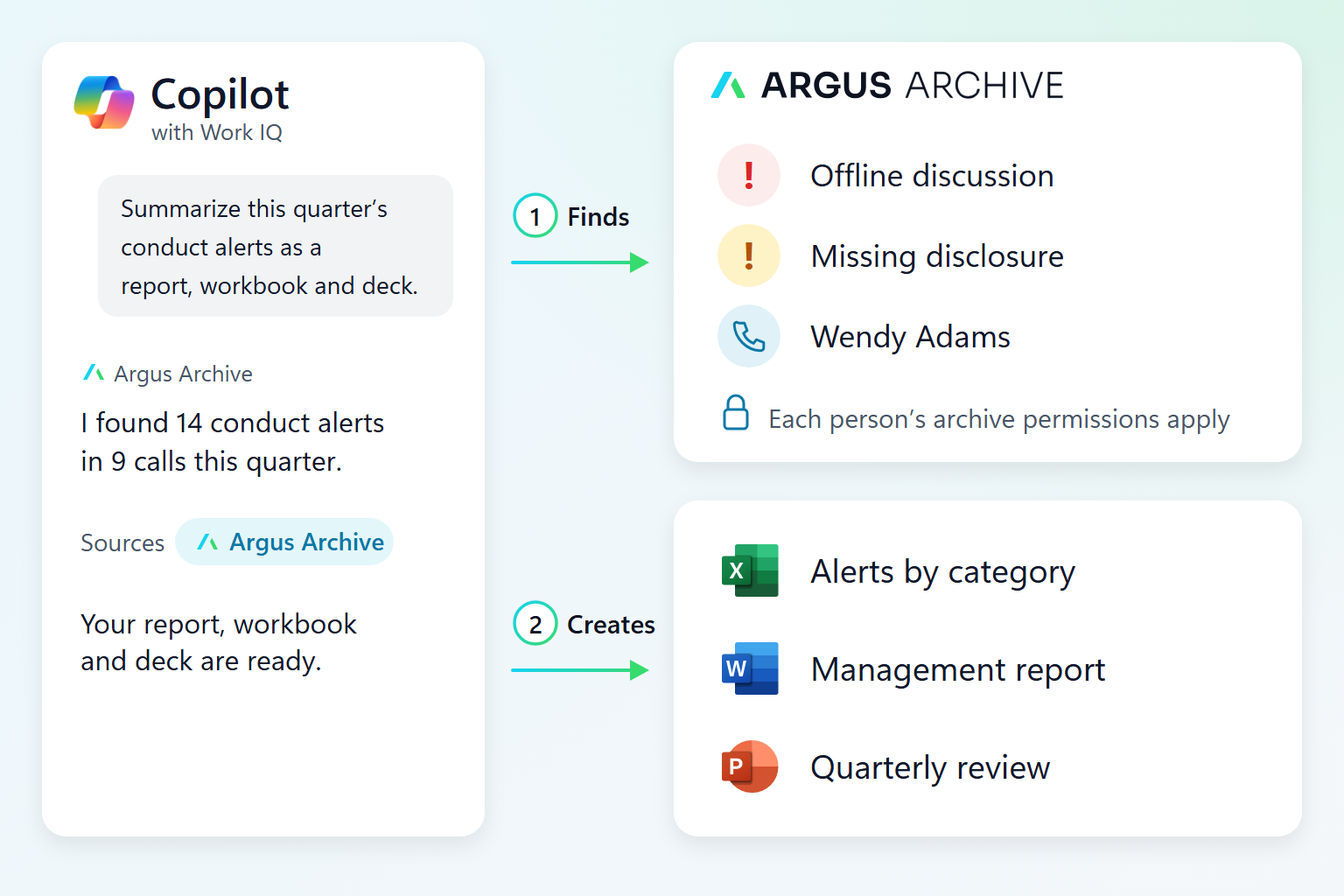
An example of how this could work: Copilot finds this quarter's conduct alerts in Argus Archive, with each person's archive permissions applied, then creates an Excel workbook, a Word report and a PowerPoint deck.
The applications aren't limited to compliance. A sales manager could analyze customer calls to understand why opportunities are being lost, then prepare a presentation for the sales team. A customer service manager could look for recurring complaints and use the findings to develop an improvement plan.
These are examples of workflows we want to explore rather than capabilities we've already validated across the new Copilot experiences. But they show why the announcements caught our attention. The archive could become a source of information for everyday business activities, with Copilot helping users turn that information into something practical.
The new Copilot Workspaces capability adds another dimension. Microsoft is moving beyond the traditional interaction between one person and an AI assistant toward shared environments where teams of people and agents can work together.
Imagine a compliance investigation involving several departments. The compliance team identifies suspicious activity, supervisors review the relevant conversations, and the legal team helps assess the evidence. Instead of exchanging files and reports between separate systems, they could work together in a shared Copilot Workspace, using AI to analyze findings, prepare documents, and coordinate the investigation.
If Argus Archive data can be made available securely within these workspaces, teams could work with information from the communications archive while keeping access to the original recordings and transcripts when needed. We'd need to test the integration and permission model before offering this as a supported workflow.
What about real-time intelligence?
Microsoft also announced the general availability of real-time meeting context in Work IQ, allowing AI agents to access meeting information while a conversation is taking place. 2
This caught our attention because it's close to something Argus Archive already does: real-time communications analysis and alerts.
Traditional communications surveillance is largely retrospective. Conversations are captured, archived, processed, and reviewed afterwards. Depending on the organization and its surveillance processes, a potential issue might not be identified until days or weeks after it occurred.
Real-time analysis shortens that gap. A financial services organization, for example, could detect a misleading statement or a missing required disclosure during a customer conversation and alert a supervisor while there's still time to respond.
Microsoft's real-time meeting context and dedicated compliance recording are not the same thing, and we'll be watching how Microsoft's capabilities develop. Regulated organizations still need comprehensive capture, reliable retention, and the ability to retrieve original communications. Even so, Microsoft's investment in live conversational intelligence supports our view that analyzing communications while they happen is worth doing.
Governance becomes even more important when AI takes action
Microsoft also put a lot of weight on security, governance, and trust.
With Agent 365, Microsoft is extending enterprise management and security controls to AI agents, while new capabilities across its security products 5 aim to give organizations greater visibility into what agents are doing. Nadella also discussed the importance of independently verifying AI actions rather than simply trusting what an AI system reports about itself. 1
"Today, we can see almost everything that models touch, but you cannot see what happens inside a model. And really, what’s worse is that we know that what a model tells us about itself is not even independent evidence, and therefore cannot be trusted. And one model monitoring another model has the same issue. You essentially have this unacceptable nested set of black boxes, which we now need to make transparent and verifiable. That’s the technical challenge."
Satya Nadella, Chairman and CEO, Microsoft, at the Ignite 2026 keynote 6
For communications compliance, this is a practical concern. If an AI agent analyzes hundreds of customer conversations and identifies a potential regulatory breach, the organization needs to be able to verify that conclusion: which conversation triggered the finding, what was actually said, which policy was applied, and how the system reached its conclusion.
That matters even more when AI-generated findings are used in management reports, regulatory investigations, or automated workflows.
An AI-generated summary isn't a replacement for the original recording, and a compliance alert doesn't necessarily prove that misconduct occurred. Organizations need to preserve the underlying evidence and keep the ability to review and challenge automated conclusions.
This is why Argus Archive includes content policy testing, evaluation datasets, version history, and traceability. We want organizations to be able to test how their AI-based policies behave, understand the results, and keep the information needed to support their compliance processes.
The same principles apply when archived communications are accessed through external AI systems. An agent should only be able to access information its user is authorized to see, and the original communications should remain subject to the archive's retention, access control, and audit requirements.
An archive that works with the rest of the enterprise
One implication of Microsoft's announcements is that people may increasingly use information from business systems without opening those systems directly.
There will always be a need for dedicated communications archiving applications. Compliance officers and investigators still need specialist capabilities for reviewing recordings, conducting searches, managing legal holds, and exporting evidence.
Not everyone who could benefit from archived communications needs those specialist tools, though.
A sales manager might prefer to ask Copilot about recurring customer objections. A compliance officer might want an Excel report showing trends across recorded conversations. A legal team might find it more convenient to work on an investigation in a shared workspace.
In these scenarios, Argus Archive can remain responsible for capturing, retaining, and governing the communications, while other applications provide additional ways to work with the information.
This is one of the reasons we've chosen to support MCP and integrate with Microsoft 365 Copilot. We don't believe every useful workflow needs to happen inside Argus Archive. There is value in letting customers use the tools they're already familiar with, while keeping the original communications in a system designed to manage them properly.
Microsoft Ignite 2026 gave us several developments to explore, from the broader Microsoft IQ architecture to Office in Copilot, shared Workspaces, and more autonomous AI agents. Not all of these capabilities are available to every customer yet, and we'll need to see how the integrations work in practice. 7
Microsoft is investing heavily in making AI a central part of enterprise operations. For organizations that already capture and retain large volumes of business communications, that creates an opportunity to get considerably more value from the information they already hold.
We're looking forward to exploring what that could mean for Argus Archive and our customers.
READY TO EXPLORE
See Argus Archive with Microsoft 365 Copilot
Search and analyze your archived calls, meetings and alerts from Microsoft 365 Copilot and other AI tools through MCP, with each person's archive permissions applied.


References
-
Microsoft: Ignite 2026: Building the frontier ecosystem: https://blogs.microsoft.com/blog/2026/11/17/ignite-2026-building-the-frontier-ecosystem/↩↩
-
Microsoft: Introducing the new Microsoft IQ: Putting your organization's intelligence to work in every agent: https://azure.microsoft.com/en-us/blog/introducing-the-new-microsoft-iq-putting-your-organizations-intelligence-to-work-in-every-agent/↩↩
-
Microsoft: What's new in Microsoft Agent 365: Ignite 2026: https://techcommunity.microsoft.com/blog/agent-365-blog/whats-new-in-microsoft-agent-365-ignite-2026/4571753↩
-
Microsoft: Copilot at Microsoft Ignite: Expanding what's possible with intelligence built for work: https://www.microsoft.com/en-us/copilot/blog/2026/11/17/copilot-at-microsoft-ignite-expanding-whats-possible-with-intelligence-built-for-work/↩↩
-
Microsoft: Security for the agentic era, powered by Microsoft Perception: https://www.microsoft.com/en-us/security/blog/2026/11/17/security-for-the-agentic-era-powered-by-microsoft-perception/↩
-
Microsoft: Satya Nadella, Microsoft Ignite keynote transcript, November 17, 2026: https://news.microsoft.com/events/wp-content/uploads/2026/11/Nadella_TRANSCRIPT_Ignite-Keynote_Nov-2026.pdf↩
-
Microsoft: Microsoft Ignite 2026 Book of News: https://news.microsoft.com/events/ignite/2026/book-of-news/↩
Featured image: Microsoft.